
Attention graduates! Please follow these steps to complete your clearance for the Career Center:
1️⃣ Survey: Log in to the "🔗NQU Graduate Exit and Career Destination Survey" (Same as your portal login) and click [Submit].
2️⃣ Screenshot: Receive the "Success Email" in your inbox and take a [Full Screenshot].
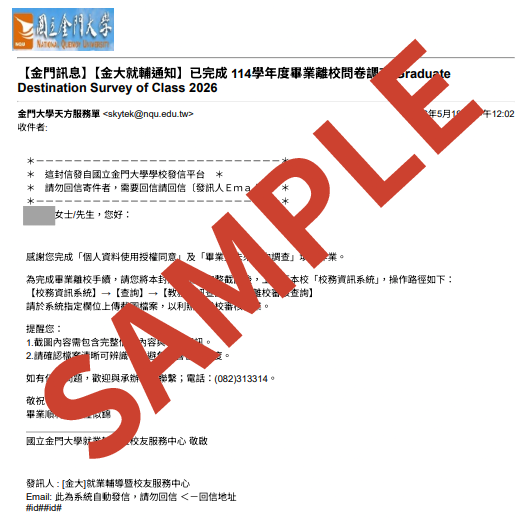
3️⃣ Upload: Go to "🔗NQU Information System" ➔ Inquiry ➔ Academic Information Inquiry ➔ Graduation Clearance Status Inquiry, and [Upload Screenshot]. Done!
⚠️ Notes:
🥸The University Information System accepts JPG and PDF files only. When converting your screenshot, please do not simply rename the file extension (for example, changing ".png" to ".jpg"), as this may result in the file being unreadable during the review process.
Missing the screenshot will delay your graduation process.
Questions? Call (082)313-314 or email easc@nqu.edu.tw.
Check the Registrar Division's website for other graduation requirements.
Happy Graduation! 🚀